
Honda HR-V: Torque Specifications
Honda HR-V (2015-2021) Service Manual / General Information / Torque Specifications
TORQUE SPECIFICATIONS (KA/KC MODELS)
NOTE:
- Refer to the appropriate portion of the manual for the precautions and complete procedures.
- Refer to the appropriate portion of the manual for the bolts/nuts not
indicated here.
- 1: Parts to be tightened in a particular order.
- 2: Follow the appropriate manual procedures closely for torque, sequence, and special steps.
- Power tools must be used appropriately.
- Follow instructions and precautions carefully per the tool's manufacturer.
- Do not use power tools for tightening. Only use them during removals of fasteners.
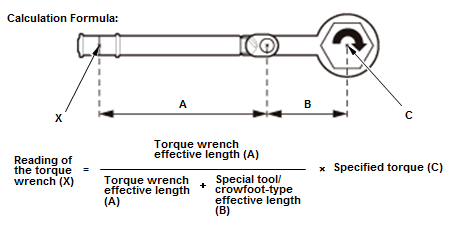
- When using some special tools or crowfoot-type wrenches, the torque
value changes due to the added leverage. The actual torque applied will be
greater than the torque
reading shown.
- The torque specification given is the actual torque, not the reading on the torque wrench.
- To compensate for this additional leverage, use the formula below to calculate the torque value reading on the torque wrench.
- Always use the special tool or crowfoot-type wrench in a straight line with the torque wrench, or you will apply improper torque.
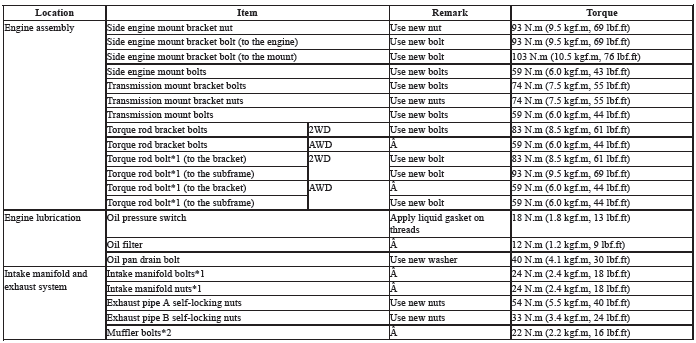
Engine Electrical

Engine Mechanical
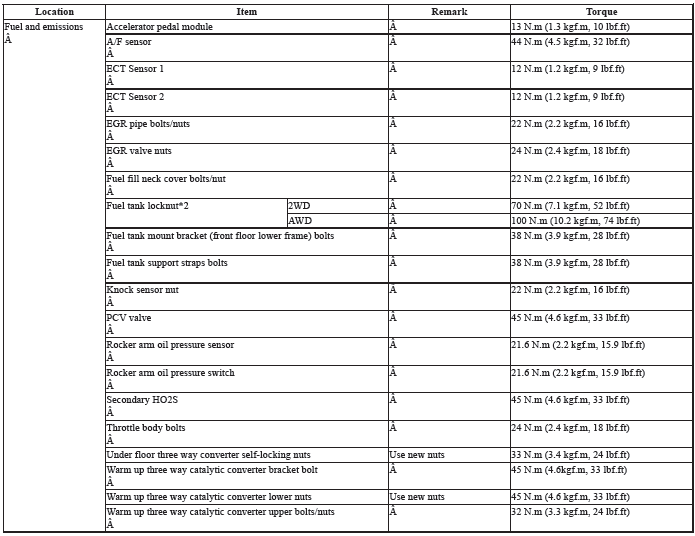
Engine Cooling

Fuel and Emissions
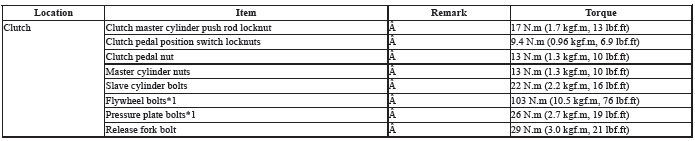
Clutch
Manual Transmission and M/T Differential

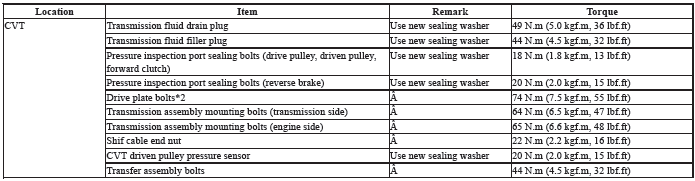
CVT and CVT Differential
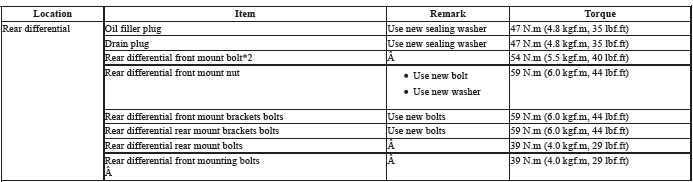
Rear Differential
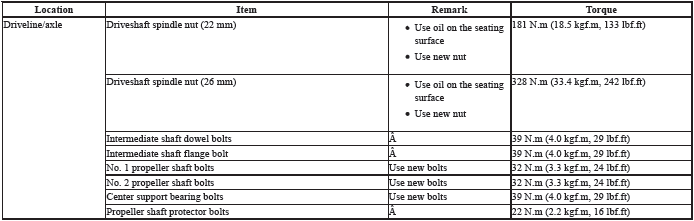
Driveline/Axle
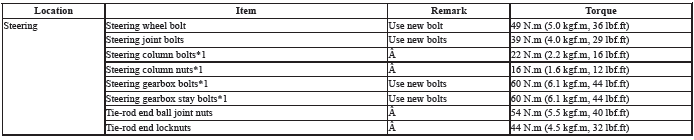
Steering
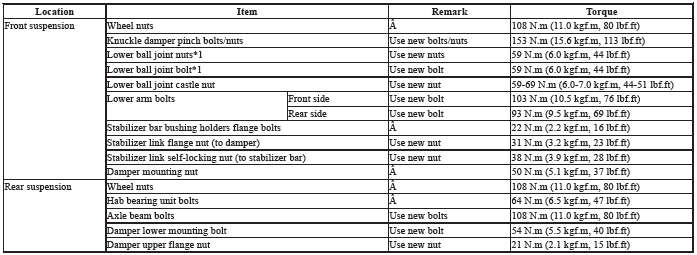
Suspension
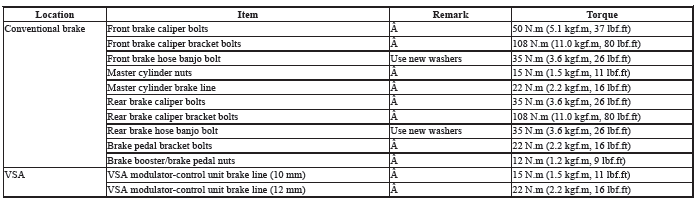
Brakes
Body

Heating, Ventilation, and Air Conditioning

Body Electrical


READ NEXT:
 Anti-Lock Brake Safety Precautions
* PLEASE READ THIS FIRST *
This article is intended for general information purposes only. This
information may not apply to all makes and
models. If vehicle is equipped with Anti-Lock Brake System (
ATEQ TPMS Reset Procedure
ATEQ TPMS RESET PROCEDURE
WITH INFORMATION DISPLAY
NOTE:
TPMS cannot be calibrated if a compact spare tire is installed.
The calibration process requires approximately 30 minutes of
cumulative
BARTEC TPMS Reset Procedure
Models With Information Display
1. Inflate tires to correct pressure.
2. Apply parking brake.
3. Turn Ignition ON.
4. Press and hold the TPMS button. The MIL will flash.
5. Release parking brake.
SEE MORE:
Making a Call
You can make calls by inputting any phone
number, or by using the imported
phonebook, call history, speed dial entries, or
redial.
Any voice-tagged speed dial entry, phonebook name,
or number can be dialed by voice from most screens.
Press the button and say
"Call" and the stored
voice tag name.
PGM-FI System Description - Components (KA/KC)
FUEL FILL CAP
FUEL TANK VAPOR/LIQUID
SEPARATION VALVE
FUEL TANK
FUEL PRESSURE REGULATOR
FUEL PUMP
FUEL FILTER
AIR FUEL RATIO (A/F) SENSOR
(SENSOR 1)
WARM UP THREEWAY CATALYTIC
CONVERTER (WU-TWC)
UNDER-FLOOR THREEWAY
CATALYTIC CONVERTER (UNDERFLOOR
TWC)
SECONDARY HEATED OXYGEN
SENSO
© 2019-2026 Copyright www.hohrv2.com
