
Honda HR-V: Safety Messages
Your safety, and the safety of others, is very important. To help you make informed decisions, we have provided safety messages, and other safety information throughout this manual. Of course, it is not practical or possible to warn you about all the hazards associated with servicing this vehicle. You must use your own good judgment.
You will find important safety information in a variety of forms including:
- Safety Labels - on the vehicle.
- Safety Messages - preceded by a safety alert symbol (Honda Caution Symbol) and one of three signal words, DANGER, WARNING, or CAUTION.

- Instructions - how to service this vehicle correctly and safely
All information contained in this manual is based on the latest product information available at the time of printing. We reserve the right to make changes at anytime without notice. No part of this publication may be reproduced, or stored in a retrieval system, or transmitted, in any form by any means, electronic, mechanical, photocopying, recording, or otherwise, without the prior written permission of the publisher. This includes text, images, and tables.
As you read this manual, you will find information that is preceded by a (NOTICE) symbol. The purpose of this message is to help prevent damage to your vehicle, other property, or the environment.

COMPONENT LOCATION INDEX
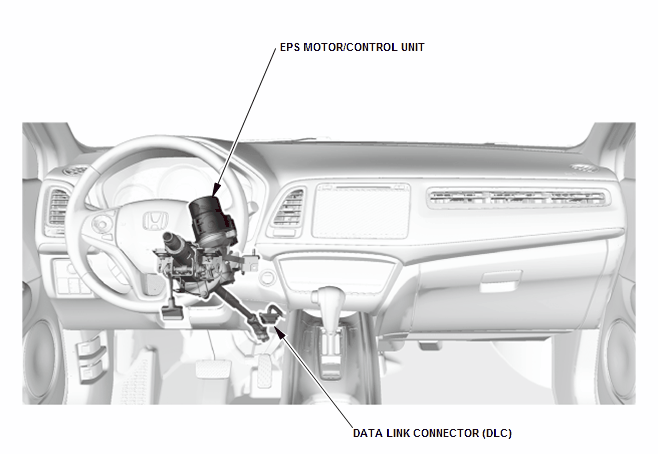
EPS COMPONENT LOCATION INDEX
READ NEXT:
 Service Specifications
SPECIFICATION TABLE
STANDARDS AND SERVICE LIMITS
Engine Electrical
Compression
Cylinder Head
Engine Block
Engine Lubrication
Cooling System
Fuel and Emissions
Clutch
Manual Transmission and
Torque Specifications
TORQUE SPECIFICATIONS (KA/KC MODELS)
NOTE:
Refer to the appropriate portion of the manual for the precautions and
complete procedures.
Refer to the appropriate portion of the manual for the bolts
Anti-Lock Brake Safety Precautions
* PLEASE READ THIS FIRST *
This article is intended for general information purposes only. This
information may not apply to all makes and
models. If vehicle is equipped with Anti-Lock Brake System (
SEE MORE:
"P", "R"
"P"
PAIR
Pulsed Secondary Air Injection
PAIR-ABV
PAIR Anti-Backfire Valve
PAIR-ACOV
PAIR Air Cut-Off Valve
PAIR-ACS
PAIR Air Control Solenoid
PAIR-ACV
PAIR Air Control Valve
PAIR-AIV
PAIR Air Injection Valve
PAIR-ASCS
PAIR Air Suction Control Solenoid
PAIR-ASOV
PAIR Air Shutoff Valve
PAIR-ASS
PAIR A
TPMS Reminder Reset - Procedure 5, 6, 7, 8, 9
TPMS REMINDER RESET - PROCEDURE 5
NOTE: Make sure the tire pressure is properly adjusted to the specified
tire pressure
listed on the doorjamb label before doing the TPMS calibration.
The calibration begins when the calibration is selected through the
Multi-Information display. The calibration is
