
Honda HR-V: Lubricants and Fluids (KA/KC Models)
Honda HR-V (2015-2021) Service Manual / General Information / Information / Lubricants and Fluids (KA/KC Models)
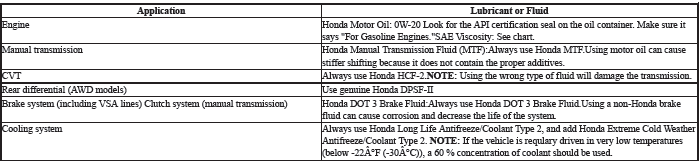
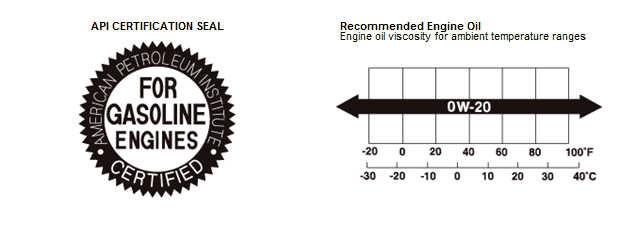
For the details of the lubrication points and the type of lubricants to be applied, refer to the illustrated index and the various work procedures (such as Assembly/Reassembly, Replacement, Overhaul, Installation, etc.) contained in each section.
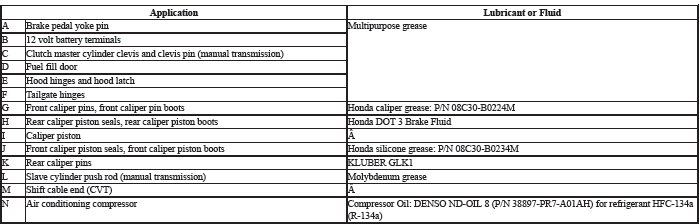
NOTE:
- Lubricate the following areas using the recommended lubricants and fluids.
- In corrosive areas, more frequent lubrication is necessary.
READ NEXT:
 Maintenance Minder General Information (KA/KC Models)
Maintenance Minder
The Maintenance Minder is an important feature of the information display.
Based on engine and transmission operating conditions, and accumulated engine
revolutions, the HR-V's on
Safety Messages
Your safety, and the safety of others, is very important. To help you make
informed decisions, we have provided safety messages, and other safety
information throughout this manual. Of
course, it is
Service Specifications
SPECIFICATION TABLE
STANDARDS AND SERVICE LIMITS
Engine Electrical
Compression
Cylinder Head
Engine Block
Engine Lubrication
Cooling System
Fuel and Emissions
Clutch
Manual Transmission and
SEE MORE:
DTC Troubleshooting B0082-12: Short to Power in the Selectable
Energy Absorption Device of the Front Passenger's Seat Belt Tensioner
NOTE:
Before doing this troubleshooting procedure, find out if the vehicle was
in a collision. If so, verify
that all the required components were replaced with new components of the
correct part number,
and that they were properly installed.
Before doing this troubleshooting procedure, rev
DTC Troubleshooting U3003-68: Electric Parking Brake Control Unit
Internal Circuit Malfunction (Power Self-Holding Circuit)
NOTE: Before you troubleshoot, review the how to troubleshoot the
electric parking brake system.
1. Problem verification:
Turn the vehicle to the ON mode.
Clear the DTC with the HDS.
Turn the vehicle to the OFF (LOCK) mode, then to the ON mode.
Check for DTCs with the HDS.
Is DTC U3003-68 i
© 2019-2026 Copyright www.hohrv2.com
